Secured Cloud Platform Listed in the Cloud Computing Catalogue
MasterDC’s fully redundant cloud platform ensures multiple data replications and guarantees CPU performance and IOPS. Gain flexibility for your projects with high security and availability demands.


configuration

of the eGovernment cloud

minimum availability

is available

9 years with us

14 years with us
11 years with us
Select a Cloud Variant
Additional Services
Server Firewall
Server Administration
Control Panel
Radware Bot Manager
DDoS Protection
Server Monitoring
SSL Certificates
Microsoft Licenses
Expert Support
IT Consulting & Training
IT Infrastructure Design
Managed Services
Corporate IT Management

Need to Migrate?
Running your services elsewhere? No problem. We will handle the migration. Just drop us a line, and we will plan a smooth transition to your new solution.

Looking For a Different Solution?
cloud configuration
Configure your own cloud
from 22 €/mo
- FW
- DDOS
- SPRAVA
- BACKUP_CLOUD
- ISP
- SSL
- MONITORING
- MSLICENCE
- CPU :
- RAM :
- HDD :
Do you need advice?
Call us +420 515 919 805
Private Cloud
Higher performance and a secure environment for critical workloads. When public cloud isn’t enough, we deliver private solutions on VMware, Hyper-V, or Proxmox VE tailored to your requirements and compliance needs. Hosted on-premises or in our data centers.
Installing Microsoft Solutions
Achieve high reliability and trouble-free program operation on a Windows Server with Microsoft products, which are fully compatible with the operating system, and their range is extensive. We will also arrange their basic installation configuration for you.
- Microsoft SQL Server
- Active Directory (AD)
- Microsoft Office Professional
- Microsoft Hyper-V
- Internet Information Services
- RDS
- OS Windows Server Datacenter
- VPN to Windows Server
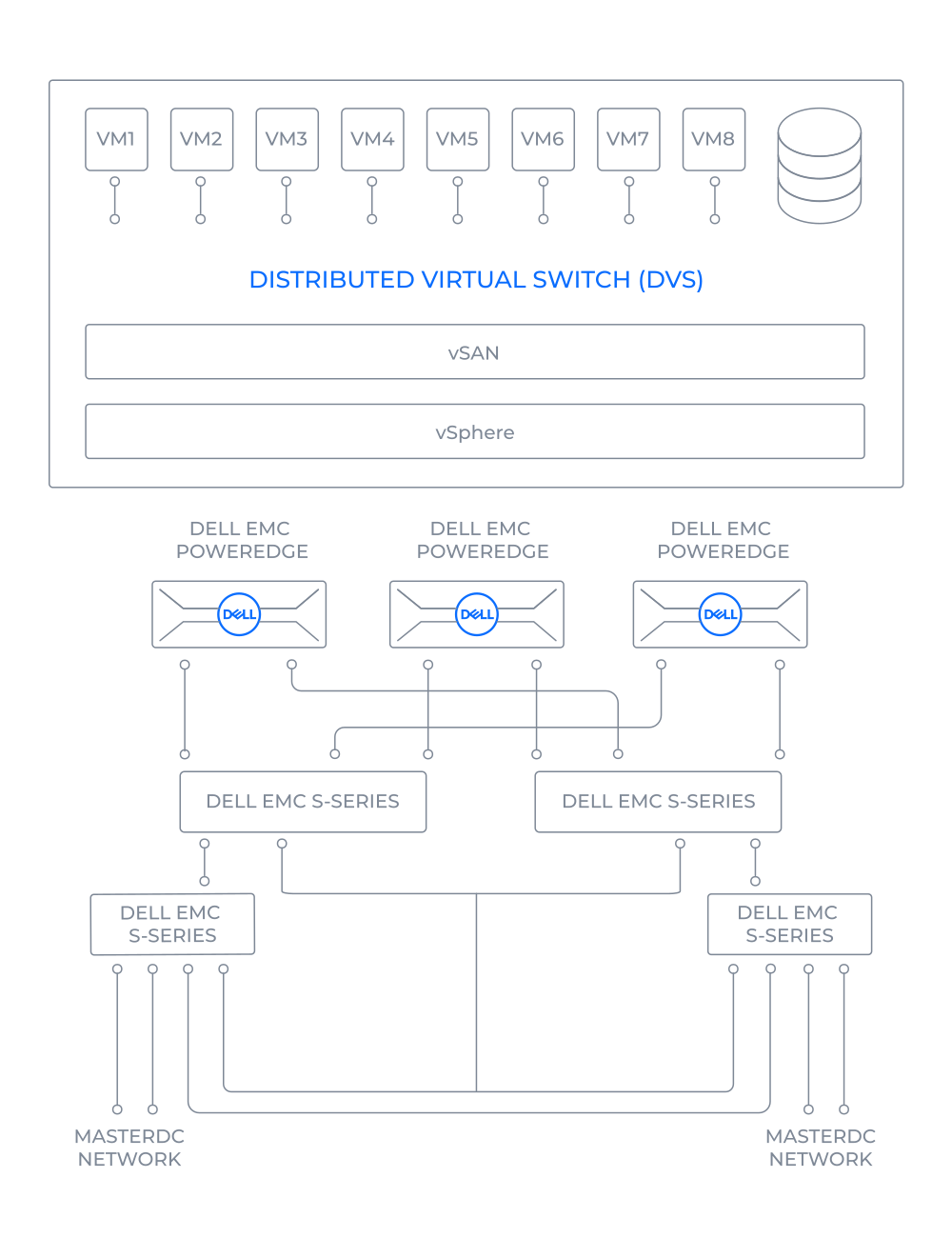
Unique Platform for Your Cloud
Our cloud platform runs on Dell hardware and is powered by VMware technologies for virtualisation. We have designed the architecture to eliminate failure risks and support even the most demanding projects.
- Efficient Dell EMC PowerEdge servers with 256 GB RAM
- Software-defined vSAN storage
- Converged Dell EMC of S series switches
- Redundant N+1 configuration, which prevents failures
Expert Support
Leverage our experts’ know-how. IT outsourcing solves specific challenges and ensures smooth, long-term maintenance of your corporate IT.
You are particularly interested in...
How do you handle security and what standards do you follow?
Keeping our data centers, services, and customer data secure is one of our top priorities. We follow internationally recognized standards such as ISO 9001, ISO/IEC 27001, ISO/IEC 27017, and ISO/IEC 27018. Our dedicated CSIRT team oversees security operations, and as members of the FENIX project, we actively support the resilience and security of internet infrastructure.
MasterDC’s cloud services are listed in the Czech Republic’s official cloud computing catalogue at level three security – the highest level a commercial provider can reach. This means our cloud platform meets strict requirements for data protection, availability, and integrity, making it a solid choice for public sector systems and other environments where security is key.
At the same time, we know that real responsibility for quality and security goes beyond certifications. That’s why we focus on continuously educating our teams, so we can deliver broad, up-to-date know-how across technologies, platforms, and current industry trends.
Will my cloud be backed up?
To ensure that your data is backed up in your cloud server, it is necessary to purchase a complementary backup service. Concerning the cloud, you might choose from three of these essential services.
What if I want to change the billing form during the course of the contract term?
You may change the billing form anytime during the contract term without waiting for the contract to expire. However, if your contract has expired, please get in touch with our Sales Representative.
How will I control my cloud?
You will control your MasterDC cloud server using the vCloud Director interface. Having established the service, you will receive an activation email that will include a URL for logging in, your login details, and instructions on how to administer the server. Via this interface, you will be able to switch off, switch on, and/or restart the server, connect your CD drive and ISO file as a virtual drive for the server, etc.
How can you guarantee 99.99% availability in cloud hosting?
Quality hardware and state-of-the-art virtualisation technology are why we can afford to guarantee such high availability of the service. Moreover, the contractual guarantee practically means any downtime must not exceed 53 minutes in total per year.
Documents & Manuals
Instructions and manuals connected with the Cloud Server services are all located in one place.
Connect with our team today to discuss your needs and schedule a meeting.
- +420 515 919 805
- sales@master.cz